New Microsoft Office Web Apps Preview
Following this post here, about experiencing modern Office with SkyDrive, namely the improved features driven by the new Office 365 Home Premium, it’s public that you can opt-in by following this: Sign in using this special link and create a new document.
After entering your SkyDrive, you get the following notification:
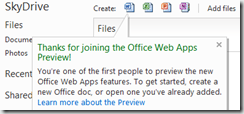 Create a new document and check out the improvements as well as the new features on these aspects:
After entering your SkyDrive, you get the following notification:

- improved authoring
- Touch support
- Document collaboration
The problem with the Web isn't old browsers, it's old ways of thinking

I posted my point of view about this smashing magazine article and also mentioned that I face this kind of article as IE trolling. Thankfully, a more open minded person shares my frustration and elaborates very well on it on this post, also from smashing magazine.
The most meaningful sentence to me was that Internet Explorer 9 is a damn good browser. The only reason it doesn’t have all of the features as Chrome and Firefox is because they rebuilt the thing from scratch so that adding more features in the future would be easier.
The author also notes that the constant drumming of “Internet Explorer X is the new Internet Explorer 6″ is getting very old. Microsoft has done a lot to try to correct their past transgressions, and it seems like there are still too many people who aren’t willing to let go of old grudges.
Anyway, no one is forced to live with Internet Explorer. If you don't like it, use the browser you feel good about.
I like Internet Explorer!
I'm a fan of smashing magazine but I was a bit let down after reading this post Dear Web User: Please Upgrade Your Browser.
It's pretty well written but It's nothing more than a designer rant and some trolling on IE.
It's true that IE falls way behind the competition on the browser extensions and integrated cloud service and it's a given fact that a lot of Windows users don't update their browser to the latest available version.
But IE9 is still a pretty good browser and the missing plug-in market is a positive thing when it comes to browser safety and stability.
Besides Internet Explorer at the work desktop, I also use Firefox and Chrome for personal stuff. Who of you have never seen this page on Chrome:
 Browser stability, compatibility and safety always rely mostly on the web developer's skills. It's not just about the browser.
It's pretty well written but It's nothing more than a designer rant and some trolling on IE.
It's true that IE falls way behind the competition on the browser extensions and integrated cloud service and it's a given fact that a lot of Windows users don't update their browser to the latest available version.
But IE9 is still a pretty good browser and the missing plug-in market is a positive thing when it comes to browser safety and stability.
Besides Internet Explorer at the work desktop, I also use Firefox and Chrome for personal stuff. Who of you have never seen this page on Chrome:
The post I mentioned makes a solid case for using Chrome, if you'd like to bother getting some fact based argument of why Internet Explorer is a decent browser, you can visit a non-affiliated web site: PCWorld. There you have the top 100 products of 2011. Internet Explorer 9 comes in at #19, the only major browser to make the list this go around.
Care to comment?
Ubuntu: installing Joomla development environment

For this purpose I chose Joomla and took the time to leave here a pretty straightforward version to set it up on a Ubuntu machine. Having said that, the following technologies will be installed:
- Apache Web server: to serve the web pages to the client browsers;
- PHP: to generate the dynamic content pages and functionalities;
- MySQL: to store all the Joomla related data, such as content and user accounts;
- PHPMyAdmin: A tool written in PHP intended to handle the administration of MySQL over the Web.
- Joomla: a free and open source content management framework (CMF) for publishing content on the Web.
sudo apt-get install apache2 php5 mysql-server phpmyadmin
The second step, still on the command shell, is to map the PHPMyAdmin alias on Apache mapping it to the corresponding installation folder. To do this, issue the following commands:
- sudo chmod 777 /etc/apache2/apache2.conf
- sudo gedit /etc/apache2/apache2.conf &
Alias /phpmyadmin /usr/share/phpmyadmin
Save the file and exit the editor. For Apache to read the new configuration, you must restart the service with the following command:
sudo /etc/init.d/apache2 restart
The third step is, of course, to install Joomla. To do so:
- Donwload the files from the Joomla official site;
- Unzip them and copy them to the Apache documents root (/var/www)
- Browse the folder on your web browser (ex: http://localhost/joomla/)

To solve this issue, type in the following commands:
- touch configuration.php
- sudo chmod 777 ./configuration.php
rm -rf ./installation
You're all done!
Free ebook: Introducing Windows Server 2012

Windows Server 2012is designed for the cloud from the ground up and provides a foundation for building both public and private cloud solutions to enable businesses to take advantage of the many benefits of cloud computing. Keeping that in mind, this book states that Windows Server 2012 is probably the most significant release of the Windows Server platform ever.
This book is presented as a “first look” based on the public beta release of Windows Server 2012 and is intended to help IT professionals familiarize themselves with the capabilities of the new platform. Below you can find the table of contents on this book:
Table of Contents
Chapter 1 The business need for Windows Server 2012The rationale behind cloud computing Making the transition
Technical requirements for successful cloud computing
Four ways Windows Server 2012 delivers value for cloud computing Foundation for building your private cloud
Chapter 2 Foundation for building your private cloud
A complete virtualization platform
Increase scalability and performance Business continuity for virtualized workloads
Chapter 3 Highly available, easy-to-manage multi-server platform
Continuous availability
Cost efficiency
Management efficiency
Chapter 4 Deploy web applications on premises and in the cloud
Scalable and elastic web platform
Support for open standards
Chapter 5 Enabling the modern workstyle
Access virtually anywhere, from any device
Full Windows experience
Enhanced security and compliance
The book can be downloaded in various formats from this official MSDN web page.
Happy reading!
Error when starting a fresh install of Umbraco CMS
Trying out Umbraco to get a feel on the ease of use and potential professional use, I got the following error when trying to start the site based on the simple starter kit :

This was disappointing, especially because we're talking about a fresh install and I hadn't fiddled with it yet.
After some scouring on the Web taking into account Umbraco was complaining about the umbraco.cms.businesslogic.macro.MacroModel, I found the solution was to edit the starter kit template so it wouldn't use macros that were not installed. So, first step, go to the Umbraco administration site and navigate to the "Developer" screen:

Expand the "Macros" node on the tree and check what macros you've got installed and take note of their aliases:
 Next navigate to the "Settings" screen:
 Then choose templates and the "StarterKit Master" template:
 In the editor, search for any macro which has an alias that doesn't match any of the currently installed. In my case it was the "BlogFeedRssLink":
 After removing this line and saving the template, the site worked fine.
This was disappointing, especially because we're talking about a fresh install and I hadn't fiddled with it yet.
After some scouring on the Web taking into account Umbraco was complaining about the umbraco.cms.businesslogic.macro.MacroModel, I found the solution was to edit the starter kit template so it wouldn't use macros that were not installed. So, first step, go to the Umbraco administration site and navigate to the "Developer" screen:
Expand the "Macros" node on the tree and check what macros you've got installed and take note of their aliases:
Subscribe to:
Posts
(
Atom
)